Here's an overview of the steps you must follow to set up the Android SDK:
2.Now after you have setup the JDK then you will download the Android SDK and for that you can simply go to the link ANDROID SDK . you can download any of the installer or zip file but the best is installer file .
3.After downloading the android sdk you will have the SDK manager which will install your required android package.
Make a note of the name and location of the SDK directory on your system—you will need to refer to the SDK directory later, when setting up the ADT plugin and when using the SDK tools from the command line.
4. Now Download The Eclipse IDE in which you have to devlop for android .
5.Your next step is installing the ADT plugin for eclipse. Now for complete tutorial on how to install the adt plugin you can refer the link as INSTALLING THE ADT PLUGIN .
6.After doing all this you have to add platforms and other components . Now you have to launch the Android SDK and AVD Manager in one of the following ways:-

- Prepare your development computer and ensure it meets the system requirements.
- Install the SDK starter package from the table above. (If you're on Windows, download the installer for help with the initial setup.)
- Install the ADT Plugin for Eclipse (if you'll be developing in Eclipse).
- Add Android platforms and other components to your SDK.
- Explore the contents of the Android SDK (optional).
2.Now after you have setup the JDK then you will download the Android SDK and for that you can simply go to the link ANDROID SDK . you can download any of the installer or zip file but the best is installer file .
3.After downloading the android sdk you will have the SDK manager which will install your required android package.
Make a note of the name and location of the SDK directory on your system—you will need to refer to the SDK directory later, when setting up the ADT plugin and when using the SDK tools from the command line.
4. Now Download The Eclipse IDE in which you have to devlop for android .
5.Your next step is installing the ADT plugin for eclipse. Now for complete tutorial on how to install the adt plugin you can refer the link as INSTALLING THE ADT PLUGIN .
6.After doing all this you have to add platforms and other components . Now you have to launch the Android SDK and AVD Manager in one of the following ways:-
- From within Eclipse, select Window > Android SDK and AVD Manager.
- On Windows, double-click the
SDK Manager.exefile at the root of the Android SDK directory
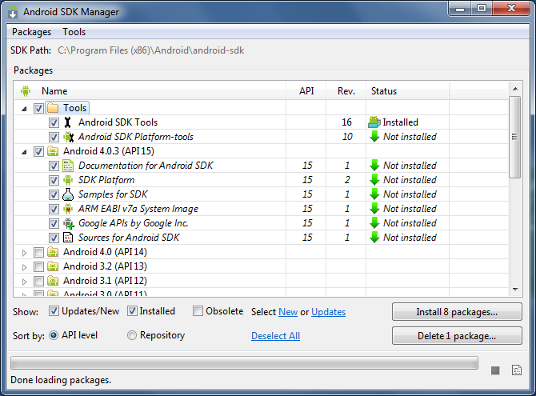
Here is the snapshot of all the above said procedure.
After doing this you have to update the path in eclipse
1. Go to Window->Prefrences->Android And give the location of the sdk where you installed after that click on apply.
And Now You are ready for android development.!!!!!!!
Readers can point out any drawbacks in the above blog !!!!!!!
After doing this you have to update the path in eclipse
1. Go to Window->Prefrences->Android And give the location of the sdk where you installed after that click on apply.
And Now You are ready for android development.!!!!!!!
Readers can point out any drawbacks in the above blog !!!!!!!

No comments:
Post a Comment